How to see your speed on CarPlay
Updated 2026-11-19 · 5 min read · By Open Road
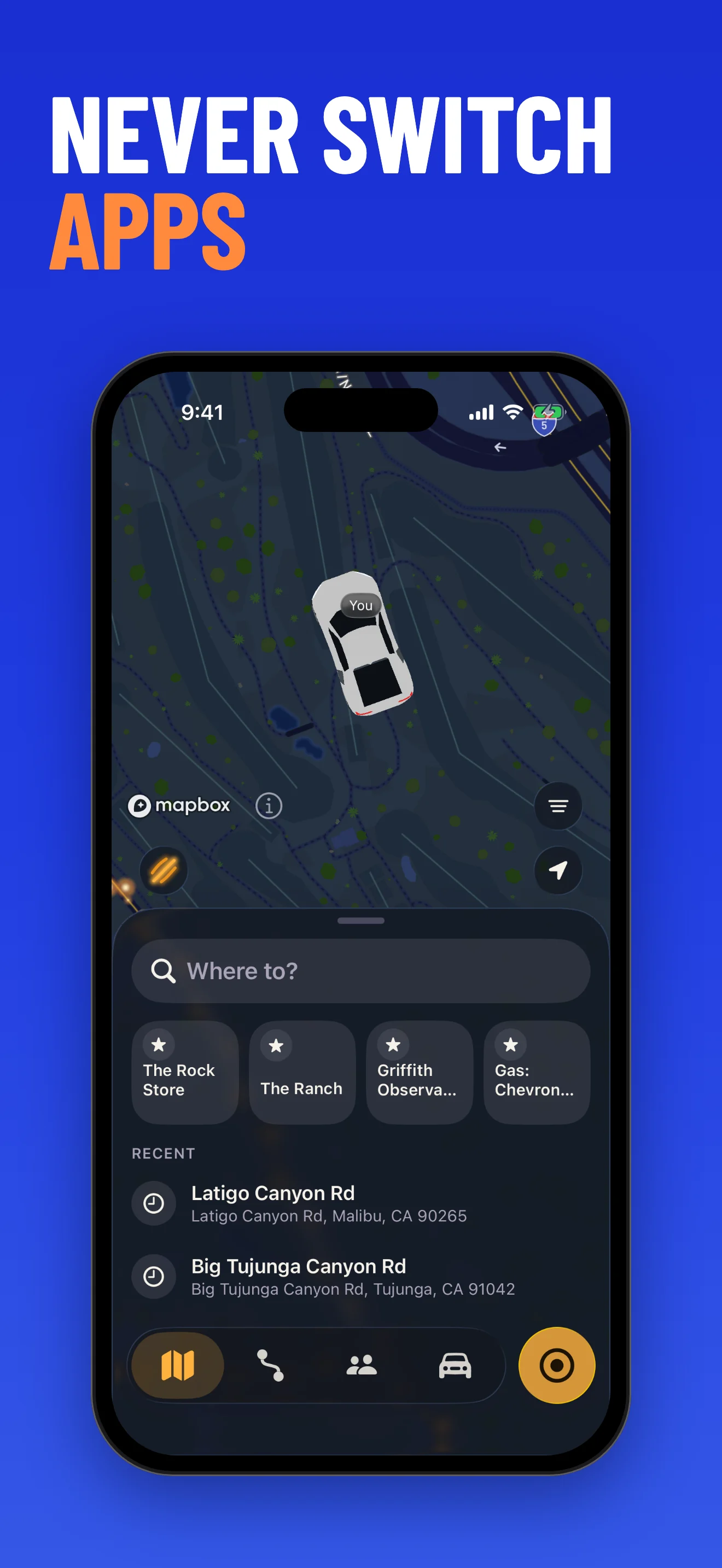
To see your speed on CarPlay, use a navigation or speedometer app that shows speed on the CarPlay screen, or keep your speed on the iPhone and use CarPlay for the map. Open Road shows live GPS speed in the iPhone app and keeps top speed with each drive. On CarPlay it gives you the driving map and navigation.
The short answer
CarPlay does not have one built-in speedometer for every app. What you see depends on the app you run on the car screen. Some navigation apps show your current speed on the map. A few dedicated speedometer apps list CarPlay support and show large speed readouts.
Which app does what changes with updates, so check the app's listing for CarPlay support before you rely on it.
Option 1: a navigation app that shows speed
Some navigation apps show your current speed on the map, and some also show the speed limit. Waze is one that does this. If you only need to glance at your speed while you navigate, this is the simplest way and you do not need a second app.
Option 2: a dedicated CarPlay speedometer app
A few speedometer apps, such as Odo Speedometer and GPS Speedometer, list CarPlay speed readouts in their App Store listings. Some of their CarPlay features sit behind a purchase, so read the listing first. These apps focus on the gauge. They do not replace a drive log.
Option 3: keep speed on your iPhone, map on CarPlay
Open Road shows live GPS speed in mph or km/h in the iPhone app and keeps your top speed with every recorded drive. On CarPlay it gives you the driving map and navigation. After you park, open the drive in your drive log to see top speed alongside the route, time and distance.
This suits you if you care about what the drive looked like afterwards more than about a big gauge on the car screen. Set up the recording and location access on your iPhone before you drive.
- Install Open Road on your iPhone and finish the in-app recording setup.
- Choose mph or km/h.
- Connect your iPhone to a car that supports Apple CarPlay.
- Use the driving map and navigation on the car screen.
- After you park, open the drive log to see top speed, route, time and distance.
Option 4: the car dashboard
Your car's own speedometer is always in front of you. Many dashboards read slightly higher than GPS speed, so the two will not match exactly. Use the dashboard for driving and an app when you want a record.
Compare the options
The table shows what each option is best for.
| Option | Best for | Keep in mind |
|---|---|---|
| Navigation app (for example Waze) | Glancing at speed while you navigate | Not a drive log |
| Dedicated CarPlay speedometer app | A big gauge on the car screen | Some CarPlay features are paid; check the listing |
| Open Road on iPhone, CarPlay for the map | Keeping speed and top speed with every drive | CarPlay shows map and navigation; review top speed on the phone |
| Car dashboard | Always visible, no phone needed | No record; can read slightly high |
If your speed shows zero
GPS speed shows zero when you are stopped or when reception is weak. Check the location access the app asks for, and try with a clear view of the sky. Tunnels and parking garages give unreliable readings.
Need a speedometer without installing anything?
Our free browser speedometer shows live speed, top speed and distance. A browser can pause location when the phone locks, so use the app for recording drives.
Next steps

Questions, answered
- Is there a CarPlay speedometer app?
- Yes, a few apps list CarPlay speed readouts in their App Store listings, and some navigation apps show speed on the map. Open Road shows live GPS speed on iPhone and keeps top speed with each drive; on CarPlay it provides the driving map and navigation.
- Does Open Road show top speed?
- Yes. Open Road keeps your top speed with each recorded drive. Open the drive in your drive log to see it with the route, time and distance.
- Does CarPlay have a built-in speedometer?
- Not one that every app uses. What you see depends on the app on the car screen. Check the app listing for CarPlay support.
- Does this work on Android?
- Apple CarPlay connects to an iPhone. Open Road is also an Android phone app, and its speed and drive log work there as well.
Keep your next drive
Get Open Road for iPhone or Android. On iPhone, 3 days free, then $39.99 per year (US price). On Android, free with optional Pro.